• Skip to content
  • Skip to primary sidebar

Header Right

  • Our CPA Firm
  • About Us
  • Contact
  • FREE CONSULTATION

Admin

Working with Downloaded Transactions in QuickBooks Online

February 20, 2019 by Admin

Downloading transactions into QBO is the easy part. You still have work to do once they’re on board.

Its ability to download financial transactions is one of the five best things about QuickBooks Online. Without it, you’d spend a lot of time on tedious data entry, verifying which checks and deposits had cleared and entering new ones.

Instead, you can easily connect to your bank and bring in all your activity from the previous hours or day. QuickBooks Online stores this neatly in a register and provides tools for you to further describe and classify each transaction.

Setting Up the Connection

Haven’t connected your financial institution to QuickBooks Online yet? It’s easy. Click the Banking link in the toolbar, then Add Account in the upper right. The Find your bank window opens. Start entering the name of your bank, credit card company, or service like PayPal in the blank field. A list of potential matches will drop down; you simply select the one you want. A window like this will open:

ll you need to do to start downloading transactions into QuickBooks Online is select your financial institution and enter the User ID and Password you use to connect directly to the site.

You will have to go through some security procedures, and then QuickBooks Online will download 90 days of transactions (you can shorten this if you’d like). You’ll also be asked which QBO account should receive the transactions. After a few minutes, the register for that account will appear, displaying the transactions you just downloaded.

Warning: The mechanics of connecting to your bank and downloading your first batch of transactions may sound easy, but if everything is not absolutely clear to you as you’re going through the process, please contact us sooner rather than later.

Working with Transactions

Once you’ve downloaded a set of transactions, you’ll want to look at them. Again, click the Banking link in the navigation toolbar. Your accounts will appear in small boxes at the top of the page, along with two balances: the one that came from the financial institution and the one in QuickBooks Online. Select the one you want by clicking on it, and its register will open.

Tip: QuickBooks Online generally updates your accounts once daily. If you want to launch a manual update at any time, click on Update in the upper right corner.

Let’s look at one downloaded transaction to see what you can do with it. Make sure the For Review column is highlighted above the register. Select a transaction by clicking on it. A window like this will open below it:

QuickBooks Online does more than simply download financial transactions: It lets you define them in greater detail.

There are several options here, including:

  • Add to register. If you’re satisfied with the information as is, just click the Add button to the right (not pictured here).
  • Split. If you want to split the amount/category (Supplies, Tools, etc.)/class of a transaction, click Split (also off to the right and not pictured). A window will open to let you specify that.
  • Assign categories. QuickBooks Online may automatically make assignments to obvious categories, which you can change if incorrect. You can also click the down arrow to the right of that field and select your own from the list.
  • Bill an expense to a customer. Did you purchase something that needs to be billed to a customer? Click in the box under Billable and select the correct one from the drop-down list that opens.
  • Find matches. This can get complicated, and we recommend you let us work with you on it. Let’s say you entered an invoice in QuickBooks Online, and an income item for that exact amount gets downloaded from your bank. QBO will assume that those two “match,” and display them in the In QuickBooks column. You can click Undo if this is incorrect. But you can also click Find match in the transaction window, and QBO will open a list of possibilities.

As you can see from browsing the lists of downloaded transactions, there’s a lot to learn here. We’d be happy to get together and walk you through your first explorations of these powerful features.

Send us an e-mail or call Rikard & Neal, CPAs, PLLC, today at 901-685-9411 to discuss your QuickBooks accounting needs with an experienced CPA. Or, request a free consultation online.

Filed Under: QuickBooks

Important Facts About the New Laws on Mortgage Interest Tax Deduction

January 28, 2019 by Admin

If you are one of the millions of Americans who own your own home, you should be thinking about how President Trump’s latest tax bill helps or dents your finances; particularly when it comes to the ever-popular mortgage interest deductions. This article should put you ahead of the subject.

First off, if you are a homeowner with no intentions of changing anything soon, your mortgage deductions are unaffected (with a couple of exceptions we deal with below).

The new laws apply only to those buying a home after 15th December 2017. If you fall into this category it boils down to understanding 3 key items:

  • There’s a cap of $750,000 (previously $1 million) on your total mortgage value (covering private and secondary homes in aggregate) that qualifies for interest deduction.
  • Discussing interest rate deduction on new home purchase goes hand-in-hand with the cap placed on Property Tax Deduction – now set at $10,000 (previously unlimited).
  • The Standard Deduction has been nearly doubled for all categories of tax filers in 2018 onwards.

Logically, anyone who intends buying in expensive locations or/and locations with property taxes above $10,000 should stop to think about it:

  • High property prices of course generally call for higher mortgage financing, And it often happens that premium locations are also the ones with the highest real estate taxes – a double whammy effect if you will.
  • In situations like this, it seems that the traditional enthusiasm around interest rate deductions may become somewhat jaded. It gives a whole new meaning to the popular realtor’s mantra, “location, location, location!”

The one escape hatch is to simply forget about itemizing interest payment and property tax claims; go to the expanded Standard Deduction now provided. But then again, the apparently increased relief offered by this new provision should be viewed alongside the knowledge that individual personal exemptions have been removed – which brings family size into the equation. If you have a lot of dependents (e.g. children or elderly parents) you may find yourself after all is said and done unchanged – or worse still, going backward.

Here’s another curveball that throws the cat amongst the pigeons: irrespective of when you bought or intend to buy your home/ homes (i.e. before or after the December 2017 law, it’s all the same) interest on second mortgages and on mortgages attached to unrented vacation residences is no longer deductible. Period. Given this, and all the other considerations are drawn into the conversation (as outlined above), it is impossible to provide a quick “catch-all” solution on interest rate deductibility. We can say this, however:

  • It is likely there’ll be a homebuyer movement away from expensive property purchases for the foreseeable future, resulting in a growing tendency to relocate to tax-friendlier regions.
  • The upper-middle class homebuyers will need to analyze these new tax provisions with a fine toothcomb, and even consider renting out vacation homes for part of the year to bring interest rate deduction back into the equation.
  • Those buying at home prices under the $750,000 cap limit with under-$10,000 property tax limits should have a far easier passage.

Conclusion: It’s at times like this that astute tax advice paves the way forward and dispels doubt. As you can see there are numerous considerations, especially for larger families and those fortunate enough to own more than one home. Also, those on the cusp of relocating should be looking at all the variables as well as state taxes before making the move. Our team is geared to answer your questions on every aspect of real estate related deductions. Contacting us sooner than later may be the wisest decision you can make this year.

Rikard & Neals CPAs, PLLC, offers financial management solutions for developers, property managers, realtors, brokers, and other real estate businesses. Call us at 901-685-9411 today for more information or request a free consultation online now.

Filed Under: Real Estate

Home Equity Loan Interest is Still in Play in 2018

December 12, 2018 by Admin

Rikard and Neal Memphis TN CPAsMost of us will agree that our biggest investment is in our home. So, it shouldn’t surprise you that your house or condo is your first port-of-call whenever there’s a need to borrow money. And the easiest way to draw funds against the security of real estate is by arranging a Home Equity Loan.

Home Equity funding helps us in important ways:

  • Number one, the interest rates payable on this type of loan are arguably the lowest available.
  • Secondly, you can get the cash working for you quickly with the least bother, paperwork and tedious protocol.
  • Then there’s the third big reason: help from Uncle Sam.

Up to now all interest payments on a Home Equity Loan were tax-deductible. It made borrowing almost a no-brainer! Who wouldn’t opt for already-low interest rates to be pulled even lower? Benefits like this are rear in our modern world where it seems like everything, including financing fees, are only going up.

Well, it’s time for a retake on the “Uncle Sam thing”: the new taxation laws as per the Tax Cuts and Jobs Act of 2017, enacted in December of the same year, have removed some delectable treats from the traditional “Home Equity feast”.

Is it likely to change your borrowing behavior anytime soon? No, but it should give you pause. There’s a certain logic to it that really can’t be argued with. Here are the new Home Equity items to keep in mind:

  • The amount you can borrow is tied to the value of the residence, be it a primary or secondary home. The I.R.S. has decided that your total loan value cannot be more than the assessed value of the asset as a start.
  • And in combination with all other mortgages cannot exceed $750,000. So Home Equity lending is not the bottomless well some may believe it to be.
  • Tax breaks haven’t disappeared but at the same time, they simply are not what they used to be. Any Home Equity draws you make from now on have to be used to build, renovate or essentially improve your residence to qualify the interest payable on them for a tax deduction.

So on this last point, for example: if you use your new funds to pay off student loans, reduce your credit card debt or splurge it on a vacation, nobody is going to stop you. What they are going to stop is anyone claiming tax relief for this type of expenditure for the foreseeable future.

TD Bank in a survey points out that 32% of Home Equity Lending fits the new definition for deductibility. Looking at it from the other side, 68% of the tax deductions we took for granted for so long now fall away. That said, we all know that there’s no substitute for smart thinking to make the most of new terms and conditions.

So don’t hesitate to consult with our professional tax team when it comes to making your Home Equity decisions, or to clarify your thinking on any tax matter. We often see benefits buried under the “strict letter of the law” – we could make a difference.

We offer financial management solutions for developers, property managers, realtors, brokers and other real estate businesses. Call us at 901-685-9411 today for more information or request a free consultation online now.

Filed Under: Business Tax

What is Qualified Business Income (QBI) and Why Does It Matter?

November 13, 2018 by Admin

rikard and neal cpas memphis TNThe new Section 199A provides self-employed taxpayers the ability to deduct up to 20% of their Qualified Business Income (QBI) on their tax returns. In general, QBI is net income that is received from a Qualified Trade or Business. However, there are some exclusions, the most common of which are capital gains, dividend and interest income. Additionally, any guaranteed payments or “reasonable compensation” paid to owners is excluded.
How Does the New Tax Law Define QBI?

Section 199A(c) defines QBI as, “the net amount of qualified items of income, gain, deduction, and loss with respect to any qualified trade or business of the taxpayer.” The section further states that qualified REIT dividends, qualified cooperative dividends, and qualified publicly traded partnership income are specifically excluded from the definition of QBI.

What are “Qualified Items of Income, Gain, Deduction, and Loss?”

Qualified items of income, gain, deduction, and loss are defined as items that are connected with a trade or business that is operated in the United States and are generally included or allowed when a business determines its taxable income for the year. However, there are items that are specifically excluded:

  • Short-term capital gains and losses
  • Long-term capital gains and losses
  • Dividends
  • Interest income
  • Foreign personal holding income
  • Income from an annuity if not received in connection with the business

These items may not be income or deductions for purposes of calculating QBI. A basic method of viewing QBI is “ordinary” income less “ordinary” expenses. In other words, investment gains and expenses are not QBI for Section 199A purposes.

Reasonable Compensation and Guaranteed Payments

In addition to the items discussed above, any reasonable compensation paid to the taxpayer by the business, including guaranteed payments, is not QBI. For example, if you receive $50,000 in wages from an LLC that you own and your share of income at the end of the year is $100,000 – only the $100,000 would be considered QBI.

Rikard & Neal CPAs, PLLC, a Memphis area CPA offers a FREE initial consultation to business owners. Email us or call us at 901-685-9411 today.

Filed Under: Business Tax

5 QuickBooks Online Add-On Apps You Should Consider Adding

October 10, 2018 by Admin

Not finding quite everything you need in QuickBooks Online? Here are some handy add-on apps available.

QuickBooks Online may work for you just fine as is. After all, it was designed to meet the needs of the millions of small businesses that want to manage and track their income and expenses, create records and transactions, and run reports to gauge their financial health. QuickBooks Online was also designed to grow along with your business. But there’s no need for Intuit to add internal features to do so. In fact, that would make it too expensive and unwieldy for many companies.

Instead, Intuit has partnered with other small business websites to provides add-ons–applications that extend the usefulness of QuickBooks Online in one or more areas, like accounts receivable and payable, inventory, and expense-tracking. They integrate easily to share data and do the extra work you need. Here are some of them to consider.

Bill.com

Bill.com automates your accounts receivable and payable processes. It supports electronic billing and payment, as well as multiple approval levels.

You can certainly enter and pay bills using QuickBooks Online. And you can send invoices to customers and receive payments. But adding a connection to Bill.com gives you more advanced options for accounts receivable and payable. Simply send your bills to Bill.com by scanning, emailing, faxing, or taking a picture with your smartphone. The site’s automation tools turn them into digital records and route them through your specified approvers. Once approved, they’re paid electronically or by paper check. Invoices are just as easy to process; customers can pay by using PayPal, credit card, or ACH. Bill.com’s mobile app makes it possible to keep up with invoices and bills while you’re out of the office.

Expensify

Are your employees still paper-clipping receipts to handwritten expense reports? This method is unnecessarily time-consuming – and often inaccurate. Expensify solves both problems. Your staff can take photos of receipts with their smartphones. Expensify then converts the expense information into coded digital records and submits them for approval based on your company’s policies. Credit card purchases can be automatically imported, too. All data is synchronized with QuickBooks Online in real-time and coded to reflect your preference of QBO’s expense accounts, customers/jobs, etc. Once you’ve approved a report, you can have the money deposited in the employee’s bank account the next day.

TSheets Time Tracking

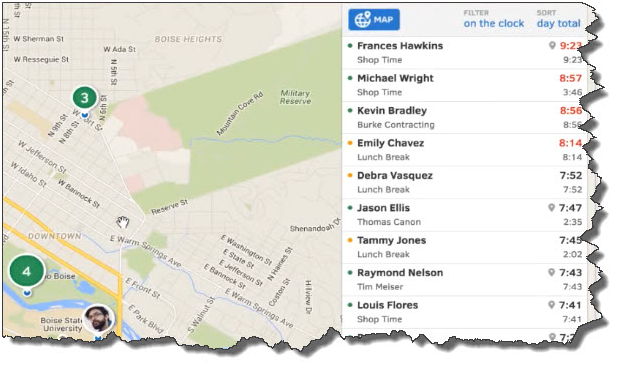
TSheets employee scheduling software automates tasks that QuickBooks Online doesn’t do: scheduling and remote time-tracking for your hourly employees. Your staff no longer has to fill in paper timesheets. Instead, they can use their smartphones to track their hours and GPS location points. And while Excel is certainly better for creating schedules than paper, TSheets takes over that task, too. After you’ve approved timesheets, that information is sent over to QuickBooks, ready for use in your payroll processing.

quickbooks

Your employees can easily “punch” in and out using their smartphones. TSheets also uses GPS technology so that your staff members’ locations are always known to you.

SOS Inventory

QuickBooks Online performs some basic inventory management tasks. You can create records for items and use them in transactions, and keep track of the number of items in stock so you know when to reorder (or have a sale). SOS Inventory goes well beyond those capabilities. You can create sales orders, track cost history and serial numbers, and document work-in-progress (WIP). SOS Inventory supports multiple locations and the entire pick/pack/ship process.

Insightly CRM

You can create thorough customer records in QuickBooks Online and document some of your interaction. But it doesn’t facilitate true Customer Relationship Management (CRM) nor project management. Insightly CRM does both. It lets you build exceptionally thorough customer profiles so that you can view social streams, email history, and any events, opportunities, or events related to them. Its project management features include the ability to track by pipelines or milestones, define contact roles and custom fields, and generate advanced project reporting.

QuickBooks Online Integration Key

All of these apps can work in standalone settings, but their integration with QuickBooks Online and their mobile capabilities create powerful partnerships that help you serve both your customers and your employees in ways that QuickBooks Online alone can’t.

We’re not trying to sell you applications here. Our concern is that you’re getting as much out of QuickBooks itself as you can. We can steer you toward add-on solutions if that seems necessary, but we’re always happy to work with you on getting to know QuickBooks Online better and matching its capabilities to your company’s needs. As Certified QuickBooks ProAdvisors in Memphis, TN, we can work with you to ensure that you are getting the most out of your QuickBooks accounting software. Give us a call at 901-685-9411 or learn more about our QuickBooks accounting services.

Filed Under: QuickBooks

Get Your Business Costs Under Control Today

September 10, 2018 by Admin

Rickard and Neal CPAs Memphis TN

Increasing your profits requires selling more and/or spending less. While building up your sales may require an extended effort, business costs are often very ripe for a quick trimming. Here are some possibilities.

Supplies and Other Purchases

Usually in any business, relatively few items represent a very large share of all outlays. The first step in cutting expenses is, therefore, to identify your highest costs. You may be able to trim many of these costs by making sure you always bid out significant purchases or by more actively seeking less expensive alternatives.

For many companies, inventory carrying costs are a very significant expense. Focusing on matching your inventory quantities more closely to your short-term needs could result in significant savings.

Telecommunications and Other Services

The ongoing services you buy may also offer the potential for cost savings. Revisit your choice of telecommunications vendor and your usage.

Look carefully at your costs for financial services. If you borrow or maintain a line of credit, always compare the rates from more than one financing source before you commit. Make sure you are not paying higher-than-necessary fees for your company’s checking and deposit services.

Cash Management

To control cash outlays, take advantage of discounts for early payment whenever possible. And look to delay payments for as long as you can without giving up discounts.

On the receiving side, deposit all receipts daily. And always actively pursue collection of any invoices that are past due. To help control your working capital needs and, therefore, your credit costs, try to match any new liabilities to your anticipated cash flow.

Fixed Expenses

One other category worth examining is fixed expenses that are long-term commitments. While you usually can’t change these quickly, be aware of when a window for change will open and prepare well in advance by considering lower cost alternatives.

To learn more ways to control your business costs give Rickard & Neal CPAs a call today. Our trained staff of professionals are always available to answer any questions you may have.

Send us an e-mail or call us today at 901-685-9411 to discuss your business needs with an experienced CPA. Or, request a free consultation online.

Filed Under: Business Tax

  • « Previous Page
  • Page 1
  • …
  • Page 13
  • Page 14
  • Page 15
  • Page 16
  • Page 17
  • Next Page »

Primary Sidebar

Our Memphis CPA Services

  • Small Business Acccounting
  • QuickBooks Accounting
  • New Business Advisory
  • Tax Services
  • Accounting by Industry

Follow our Blog

Loading

Search

Categories

  • Business Best Practices
  • Business Tax
  • Covid
  • Incorporation
  • Individual Tax
  • QuickBooks
  • Real Estate
  • Small Business Taxes
  • Uncategorized

Connect

Memphis, TN CPA Firm

5100 Wheelis Drive, Suite 110
Memphis, TN 38117
901-685-9411

Copyright © 2018 · https://www.rikardneal.com/blog