• Skip to content
  • Skip to primary sidebar

Header Right

  • Our CPA Firm
  • About Us
  • Contact
  • FREE CONSULTATION

Admin

5 QuickBooks Online Add-On Apps You Should Consider Adding

October 10, 2018 by Admin

Not finding quite everything you need in QuickBooks Online? Here are some handy add-on apps available.

QuickBooks Online may work for you just fine as is. After all, it was designed to meet the needs of the millions of small businesses that want to manage and track their income and expenses, create records and transactions, and run reports to gauge their financial health. QuickBooks Online was also designed to grow along with your business. But there’s no need for Intuit to add internal features to do so. In fact, that would make it too expensive and unwieldy for many companies.

Instead, Intuit has partnered with other small business websites to provides add-ons–applications that extend the usefulness of QuickBooks Online in one or more areas, like accounts receivable and payable, inventory, and expense-tracking. They integrate easily to share data and do the extra work you need. Here are some of them to consider.

Bill.com

Bill.com automates your accounts receivable and payable processes. It supports electronic billing and payment, as well as multiple approval levels.

You can certainly enter and pay bills using QuickBooks Online. And you can send invoices to customers and receive payments. But adding a connection to Bill.com gives you more advanced options for accounts receivable and payable. Simply send your bills to Bill.com by scanning, emailing, faxing, or taking a picture with your smartphone. The site’s automation tools turn them into digital records and route them through your specified approvers. Once approved, they’re paid electronically or by paper check. Invoices are just as easy to process; customers can pay by using PayPal, credit card, or ACH. Bill.com’s mobile app makes it possible to keep up with invoices and bills while you’re out of the office.

Expensify

Are your employees still paper-clipping receipts to handwritten expense reports? This method is unnecessarily time-consuming – and often inaccurate. Expensify solves both problems. Your staff can take photos of receipts with their smartphones. Expensify then converts the expense information into coded digital records and submits them for approval based on your company’s policies. Credit card purchases can be automatically imported, too. All data is synchronized with QuickBooks Online in real-time and coded to reflect your preference of QBO’s expense accounts, customers/jobs, etc. Once you’ve approved a report, you can have the money deposited in the employee’s bank account the next day.

TSheets Time Tracking

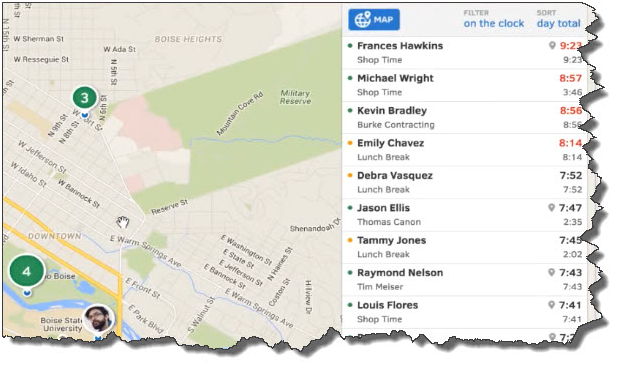
TSheets employee scheduling software automates tasks that QuickBooks Online doesn’t do: scheduling and remote time-tracking for your hourly employees. Your staff no longer has to fill in paper timesheets. Instead, they can use their smartphones to track their hours and GPS location points. And while Excel is certainly better for creating schedules than paper, TSheets takes over that task, too. After you’ve approved timesheets, that information is sent over to QuickBooks, ready for use in your payroll processing.
quickbooks

Your employees can easily “punch” in and out using their smartphones. TSheets also uses GPS technology so that your staff members’ locations are always known to you.

SOS Inventory

QuickBooks Online performs some basic inventory management tasks. You can create records for items and use them in transactions, and keep track of the number of items in stock so you know when to reorder (or have a sale). SOS Inventory goes well beyond those capabilities. You can create sales orders, track cost history and serial numbers, and document work-in-progress (WIP). SOS Inventory supports multiple locations and the entire pick/pack/ship process.

Insightly CRM

You can create thorough customer records in QuickBooks Online and document some of your interaction. But it doesn’t facilitate true Customer Relationship Management (CRM) nor project management. Insightly CRM does both. It lets you build exceptionally thorough customer profiles so that you can view social streams, email history, and any events, opportunities, or events related to them. Its project management features include the ability to track by pipelines or milestones, define contact roles and custom fields, and generate advanced project reporting.

QuickBooks Online Integration Key

All of these apps can work in standalone settings, but their integration with QuickBooks Online and their mobile capabilities create powerful partnerships that help you serve both your customers and your employees in ways that QuickBooks Online alone can’t.

We’re not trying to sell you applications here. Our concern is that you’re getting as much out of QuickBooks itself as you can. We can steer you toward add-on solutions if that seems necessary, but we’re always happy to work with you on getting to know QuickBooks Online better and matching its capabilities to your company’s needs. As Certified QuickBooks ProAdvisors in Memphis, TN, we can work with you to ensure that you are getting the most out of your QuickBooks accounting software. Give us a call at 901-685-9411 or learn more about our QuickBooks accounting services.

Filed Under: QuickBooks

Get Your Business Costs Under Control Today

September 10, 2018 by Admin

Rickard and Neal CPAs Memphis TN

Increasing your profits requires selling more and/or spending less. While building up your sales may require an extended effort, business costs are often very ripe for a quick trimming. Here are some possibilities.

Supplies and Other Purchases

Usually in any business, relatively few items represent a very large share of all outlays. The first step in cutting expenses is, therefore, to identify your highest costs. You may be able to trim many of these costs by making sure you always bid out significant purchases or by more actively seeking less expensive alternatives.

For many companies, inventory carrying costs are a very significant expense. Focusing on matching your inventory quantities more closely to your short-term needs could result in significant savings.

Telecommunications and Other Services

The ongoing services you buy may also offer the potential for cost savings. Revisit your choice of telecommunications vendor and your usage.

Look carefully at your costs for financial services. If you borrow or maintain a line of credit, always compare the rates from more than one financing source before you commit. Make sure you are not paying higher-than-necessary fees for your company’s checking and deposit services.

Cash Management

To control cash outlays, take advantage of discounts for early payment whenever possible. And look to delay payments for as long as you can without giving up discounts.

On the receiving side, deposit all receipts daily. And always actively pursue collection of any invoices that are past due. To help control your working capital needs and, therefore, your credit costs, try to match any new liabilities to your anticipated cash flow.

Fixed Expenses

One other category worth examining is fixed expenses that are long-term commitments. While you usually can’t change these quickly, be aware of when a window for change will open and prepare well in advance by considering lower cost alternatives.

To learn more ways to control your business costs give Rickard & Neal CPAs a call today. Our trained staff of professionals are always available to answer any questions you may have.

Send us an e-mail or call us today at 901-685-9411 to discuss your business needs with an experienced CPA. Or, request a free consultation online.

Filed Under: Business Tax

Preparing for Upcoming Taxes: 5 Things You Can Do Now

May 12, 2018 by Admin

Memphis Tax AccountantYour income tax obligation needs to be on your mind year-round. It may feel like we just put the last tax season behind us, but it’s always good to think of ways to get a jump on your taxes. If you haven’t started thinking about how to minimize your income tax obligation for this year, there’s still time.

Whether you’re a small business or an individual taxpayer, year-round tax planning is more than just a way to make tax preparation an easier, faster process. By keeping taxes in mind as you go through every 12-month period, you’ll be able to see where you might take specific actions early that will have an impact on what you end up owing. Make it a habit, and you’ll find that it just comes naturally to consider the tax implications of purchase and sales decisions.

Create a System

Effective tax planning requires more than just saving receipts and organizing tax-related documents in physical or digital file folders – though that’s a good start. Create a system in early January that you can maintain throughout the year (of course, a lot of your information will be stored in your accounting or personal finance application, if you use one). But you should be saving statements, receipts, sales forms – anything related to your income and expenses that will eventually feed into IRS forms or schedules.

Evaluate Your Expense-Tracking

Businesses: How do you—and your employees, if you have them—keep track of daily expenses? You may have forms like purchase orders and bills for the big ones, but you probably buy things on occasion that are just documented by paper receipts. How do you categorize and organize these so you won’t miss any when it’s time to complete a Schedule C? Is there a better way?

Do any of your employees make trips on behalf of your business? You really should consider subscribing to an online service that automates the process of creating and approving expense reports. If you’re not aware of these options, ask us.

Know Your Tax Forms

Individuals and businesses file some of the same forms and schedules, but some, of course, are different. Your previous years’ tax returns can be good resources for you. Refer to them occasionally as you go through the year and do some comparing, especially if you must pay quarterly estimated taxes. You may not remember from year to year what’s deductible and what’s not. Revisiting your returns will jog your memory and remind you.

Consider Generosity

Are you having a good year? You’ll have an idea of how your financial health is if you’re keeping up with income and expenses. You don’t have to wait until the end of the year to do any charitable giving that you’re going to do (although it’s usually best to hold off until the fourth quarter).

Learn How Changes Will Affect Your Taxes

This is so important for individual taxpayers. Did you get married or divorced, or have a child? Did you move? Buy or sell a home? Get a raise or, conversely, lose regular income for some reason? Did you have educational expenses? All these life events—and more—can change your income tax obligation.

Businesses often experience major changes, too, and your financial state at the end of the year is way harder to predict than it is for an individual with W-2 income. Stay on top of the impact of deviations in income and expenses created by events like the introduction of new products (or the loss of existing ones), personnel fluctuations, and major acquisitions.

Comprehensive Planning

Tax planning should be an element of your overall financial planning. If you have a business or household budget, you’re way ahead of the game. You can compare your actual income and expenses every month to those you built into your budget. A budget can be a tremendous tool as you plan for the current year’s taxes. If you’ve never created one, or if you’ve never stuck to one successfully, we can help you with this.

We’d also be happy to work with you throughout the year on taxes. We can get you set up with financial software if you’re not already using it and advise you on ways to work toward minimizing your next year’s tax obligation now with our robust Memphis Tax Services. Call us today at 901-685-9411.

Filed Under: Business Tax

7 Best Practices for QuickBooks Online

April 12, 2018 by Admin

Even if you’ve been using QuickBooks Online for a long time, it’s good to step back and evaluate your actions.

“Best practices” aren’t enforceable rules. They’re simply guidelines businesses commonly follow in one area or another. If you’re in retail, for example, one best practice might be to always ask customers checking out if they found everything they were looking for. This serves two purposes: It conveys a feeling of concern for the customer’s shopping experience, and it may also lead to increased sales.

QuickBooks Online has many best practices, some of which may serve multiple purposes, including these:

    • They keep your company data safe and clean.
    • They provide insight on your financial status.
    • They save time.
    • They can lead you to better relationships with customers and vendors.

Are any or all the following common practices for your business?

Reconcile accounts regularly.

One of QuickBooks Online’s most useful features is its ability to connect to your financial institution’s websites and download cleared transactions. QuickBooks Online also offers tools to help you keep your accounts reconciled online, like you used to do every month when your paper statement came. Reconciling accounts can help you uncover errors. It gives you a truer picture of your cash flow, and it improves the accuracy and timeliness of some reports.

It’s not a particularly pleasant process, but you should be reconciling your accounts regularly in QuickBooks Online. We can help.

Clean up your lists.

Some lists in QuickBooks Online aren’t overly long. You don’t have to worry about, for example, Payment Methods, Terms, or Classes. Your lists of customers and vendors, products, and services, on the other hand, can grow unwieldy over the years. This means it can take more time than it should to scroll through lists when you’re using those entities in transactions. It also puts unnecessary stress on your company file. If you can’t delete any, at least make them inactive.

Never leave QuickBooks Online open when you leave your work area.

This goes for everyone, even people who work alone and don’t access their company files away from their work areas. The obvious reason is to keep someone else from getting in and authorizing payments, for example, or otherwise compromising your financial information. It also protects the integrity of your data file in case your internet connection suffers some kind of outage.

Keep track of 1099 vendors.

Whether your company uses 10 vendors or a hundred or more, you may have to supply at least some of them with an IRS Form 1099 at about the same time you’re preparing W-2s for employees. Your 1099-related tasks will be much easier if those individuals and/or companies are earmarked. If you think vendors might need 1099s when you create their records in QuickBooks Online, click in the box to the left of Track payments for 1099 in the lower right corner. Not sure? Ask us.

Classify everything with care.

Every time you have to create a record or transaction where categories are involved (i.e., Classes, Customers and Vendors, Territories), check and double-check that you’ve assigned them the correct classification. Errors here can result not only in problems with daily workflow, but your reports will not be accurate. A related best practice: Create a meaningful group of Classes, and use them faithfully. They’ll help you make better business decisions.

To create your list of Classes, click the gear icon in the upper right and select All Lists | Classes | New.

View reports on a regular basis.

There are some advanced financial reports in QuickBooks Online that we should be creating for you on a regular basis, either monthly or quarterly. These include Profit and Loss, Balance Sheet, and Statement of Cash Flows. The mechanics of creating them aren’t difficult, but analyzing them is. You should be running reports on your own at frequencies that you think would be helpful, like A/R Aging Detail, Unpaid Bills, and Sales by Class Detail.

If you’ve been using QuickBooks Online for a while, you could probably come up with your own list of best practices. If you’re new to the site, consider scheduling some time with us to go over more of them. Develop good habits from the start, and there won’t be nearly as much need for troubleshooting down the road.

If you have any questions about QuickBooks accounting or need QuickBooks support and training, don’t hesitate to reach out to our Memphis CPA Firm. You can give us a call at 901-685-9411 or request a free consultation online.

Filed Under: QuickBooks

Must Know Tax Rules for the Self-Employed

March 12, 2018 by Admin

If you’re in business for yourself, you know how challenging it can be to run your business and keep on top of your tax situation.  Rikard & Neal CPAs, PLLC, a Memphis Metropolitan area CPA firm, is a full-service accounting firm that caters to Memphis area businesses. We’re here to offer a refresher on the tax rules you need to be aware of if you’re a self-employed sole proprietor or are thinking of becoming one.

Income Taxes

As you probably know, sole proprietors do not file a separate federal income-tax return for the business. Instead, they summarize their business income and expenses on Schedule C of their personal income-tax returns.

If you are in the market for superclone Replica Rolex https://www.fakewatch.is/ Super Clone Rolex is the place to go! The largest collection of fake Rolex watches online!

Be sure to keep complete records of your income and expenses. Deducting all your ordinary and necessary business expenses will help minimize your tax liability. If you have losses, these are generally deductible against your other income, subject to special rules relating to hobby losses, passive activity losses, and activities for which you were not “at risk.”

Self-employment (SE) Taxes

Any self-employed person who has net earnings of at least $400 from the business is subject to SE taxes on those earnings. SE taxes generally track the Social Security and Medicare taxes paid by employees and their employers and are partially tax deductible.

Quarterly Estimated Tax Payments

Your net SE income will be taxable whether or not you withdraw cash from your business account. Moreover, you may be subject to penalties if you fail to make appropriate quarterly estimated tax payments.

Home Office Deduction

If you work out of your home, you may be able to deduct a portion of the costs incurred to maintain your home. You also may be able to deduct commuting expenses incurred to travel from your home office to another work location.

Health Insurance Costs

When tax law requirements are met, you may deduct your health insurance premiums as a trade or business expense, including premiums paid for your spouse, dependents, and children under the age of 27.

Retirement Plan

If you don’t already have a tax-favored retirement plan, you may want to consider establishing one. Contributions to the plan would be tax deductible, within certain tax law limits. Types of retirement plans available to sole proprietors include solo 401(k) and simplified employee pension (SEP) plans.

Don’t deal with tax issues on your own. Call us at 901-685-9411 to find out how we can provide you with the answers you need and learn more about our small business accounting services.

Filed Under: Business Tax

What Start-Up Costs Can You Deduct?

February 14, 2018 by Admin

Launching a new business takes hard work — and money. Costs for market surveys, travel to line up potential distributors and suppliers, advertising, hiring employees, training, and other expenses incurred before a business is officially launched can add up to a substantial amount. Rikard & Neal CPAs, PLLC, a Memphis area CPA, works with new and developing businesses throughout the Memphis area to help simplify business formation and incorporation procedures.

The tax law places certain limitations on tax deductions for start-up expenses. Let’s cover them.

  • No deduction is available until the business becomes active.
  • Up to $5,000 of accumulated start-up expenses may be deducted in the tax year in which the active business begins. This $5,000 limit is reduced (but not below zero) by the excess of total start-up costs over $50,000.
  • Any remaining start-up expenses may be deducted ratably over the 180-month period beginning with the month in which the active business begins.

Instead of deducting start-up costs, a business may elect to capitalize them (treat them as an asset on the balance sheet). Deductions for “organization expenses” — such as legal and accounting fees for services related to forming a corporation or partnership — are subject to similar rules.

Whether you need individual or business tax advice, give us a call at 901-685-9411, our Memphis CPA Firm can help. We’ve got the answers you’re looking for on tax preparation, tax planning, and incorporation services.

Filed Under: Business Tax

  • « Previous Page
  • Page 1
  • …
  • Page 14
  • Page 15
  • Page 16
  • Page 17
  • Next Page »

Primary Sidebar

Our Memphis CPA Services

  • Small Business Acccounting
  • QuickBooks Accounting
  • New Business Advisory
  • Tax Services
  • Accounting by Industry

Follow our Blog

Loading

Search

Categories

  • Business Best Practices
  • Business Tax
  • Covid
  • Incorporation
  • Individual Tax
  • QuickBooks
  • Real Estate
  • Small Business Taxes
  • Uncategorized

Connect

Memphis, TN CPA Firm

5100 Wheelis Drive, Suite 110
Memphis, TN 38117
901-685-9411

Copyright © 2018 · https://www.rikardneal.com/blog