• Skip to content
  • Skip to primary sidebar

Header Right

  • Our CPA Firm
  • About Us
  • Contact
  • FREE CONSULTATION

2021 Q1 tax calendar: Key deadlines for businesses and other employers

December 22, 2020 by Rikard Neal

Here are some of the key tax-related deadlines affecting businesses and other employers during the first quarter of 2021. Keep in mind that this list isn’t all-inclusive, so there may be additional deadlines that apply to you. Contact us to ensure you’re meeting all applicable deadlines and to learn more about the filing requirements.

January 15

  • Pay the final installment of 2020 estimated tax.
  • Farmers and fishermen: Pay estimated tax for 2020.

February 1 (The usual deadline of January 31 is a Sunday)

  • File 2020 Forms W-2, “Wage and Tax Statement,” with the Social Security Administration and provide copies to your employees.
  • Provide copies of 2020 Forms 1099-MISC, “Miscellaneous Income,” to recipients of income from your business where required.
  • File 2020 Forms 1099-MISC reporting nonemployee compensation payments in Box 7 with the IRS.
  • File Form 940, “Employer’s Annual Federal Unemployment (FUTA) Tax Return,” for 2020. If your undeposited tax is $500 or less, you can either pay it with your return or deposit it. If it’s more than $500, you must deposit it. However, if you deposited the tax for the year in full and on time, you have until February 10 to file the return.
  • File Form 941, “Employer’s Quarterly Federal Tax Return,” to report Medicare, Social Security and income taxes withheld in the fourth quarter of 2020. If your tax liability is less than $2,500, you can pay it in full with a timely filed return. If you deposited the tax for the quarter in full and on time, you have until February 10 to file the return. (Employers that have an estimated annual employment tax liability of $1,000 or less may be eligible to file Form 944, “Employer’s Annual Federal Tax Return.”)
  • File Form 945, “Annual Return of Withheld Federal Income Tax,” for 2020 to report income tax withheld on all nonpayroll items, including backup withholding and withholding on accounts such as pensions, annuities and IRAs. If your tax liability is less than $2,500, you can pay it in full with a timely filed return. If you deposited the tax for the year in full and on time, you have until February 10 to file the return.

March 1 (The usual deadline of February 28 is a Sunday)

  • File 2020 Forms 1099-MISC with the IRS if: 1) they’re not required to be filed earlier and 2) you’re filing paper copies. (Otherwise, the filing deadline is March 31.)

March 16

  • If a calendar-year partnership or S corporation, file or extend your 2020 tax return and pay any tax due. If the return isn’t extended, this is also the last day to make 2020 contributions to pension and profit-sharing plans.

© 2020

Filed Under: Uncategorized

Pros and Cons of a Paperless Business

December 19, 2020 by Admin

rikard and neal cpas memphis TNHas your bank, broker, credit card company, or maybe even your phone or utility company sent you information about getting your statements online instead of through the mail? Going paperless has its advantages — not the least of which may be seeing your countertop for the first time in months. But it also has its drawbacks. Before you completely eliminate paper statements, look at both the pros and cons.

The Benefits

When customers manage their accounts online, companies can save substantial amounts of money in printing and mailing costs. That’s why many companies offer incentives, such as reducing interest rates or fees or making donations to environmental groups, to encourage customers to go paperless. And fewer mailings mean there’s less risk that someone could steal personal documents from your mailbox and use the information fraudulently.

The Drawbacks

While companies claim financial information sent electronically is more secure, not everyone agrees. When they happen, security breaches can put your personal information at risk. And it may be easier to miss the e-mail or forget about reviewing statements or paying bills when you don’t have them right in front of you.

Another potential drawback: Retrieving statements that are more than a few months old may be difficult, although many companies say they’re working on archiving several years’ worth of documents.

Going paperless may be to your advantage, but weigh everything carefully before you sign up.

Take charge of your financial future. Give us a call, today, to find out how we can assist you and your business.

Send us an e-mail or call us today at 901-685-9411 to discuss your business needs with an experienced CPA. Or, request a free consultation online.

Filed Under: Business Best Practices

10 Tips for Better Budgeting…

November 20, 2020 by Admin

Rikard & Neal Business Tax…and how QuickBooks Online can help you with the mechanics.

If you already have a budget, it’s probably been difficult for you to stick with it for the last several months. Unless you provide products and/or services that have been in great demand since the COVID-19 pandemic took hold, you’ve had to adjust your budget significantly.

Better days are ahead, though, and now is a good time to start doing some planning for 2021. While there are still likely to be uncertainties next year, creating a budget will give you a starting point. A budget increases your awareness of all of your projected income and expenses, which may make it less likely that you’ll find yourself constantly running short on funds.

Here are some ways you can make your budgeting process more effective and realistic.

Use what you already know. Unless you’re starting a brand-new business, you already have the best resource possible: a record of your past income and expenses. Use this as the basis for your projections.

Be aware of your sales cycle. Even if you’re not a seasonal business, you’ve probably learned that some months or quarters are better than others. Budget conservatively for the slower months.

Distinguish between essential and non-essential expenses. Enter your budget items for the bills and other expenses that must be covered before you add optional categories.

QuickBooks tips

You can use data from a previous year to create a new budget in QuickBooks Online.

Keep it simple. Don’t budget down to the last paper clip. You risk budget burnout, and your reports will be unwieldy.

Build in some backup funding. Just as you’re supposed to have an emergency fund in your personal life, try to create one for your business.

Make your employees part of the process. You shouldn’t be secretive about the expense element of your budget. Try to get input from staff in areas where they have knowledge.

Overestimate your expenses, a little. This can help prevent “borrowing” from one budget category to make up for a shortfall in another.

Consider using excess funds to pay down debt. Debt costs you money. The sooner you pay it off, the sooner you can use those payments for some non-essential items.

Look for areas where you can change vendors. As you’re creating your budget think carefully about each supplier of products and services. Can you find less costly alternatives?

Revisit your budget frequently. You should evaluate your progress at least once a month. In fact, you could even start by budgeting for only a couple of months at a time. You’ll learn a lot about your spending and sales patterns that you can use for future periods.

How QuickBooks Online Can Help

QuickBooks Online offers built-in tools to help you create a budget. Click the gear icon in the upper right corner and select Budgeting under Tools. Click Add budget. At the top of the screen, give your budget a Name and select the Fiscal Year it should cover from the drop-down list by that field. Choose an Interval (monthly, quarterly, or yearly) and indicate whether you want to Pre-fill data from an existing year.

QuickBooks tips

QuickBooks Online supplies a budget template that already contains commonly used small business items.

The final field is labeled Subdivide by, which is optional. You can set up budgets that only include selected Customers or Classes, for example. Select the desired divider in that field, then choose who or what you want included in the next. Click Next or Create Budget in the lower right corner (depending on whether you used pre-filled data) to open your budget template. If you subdivided the budget, you’ll see a field marked View budget for. Click the down arrow and select from the options listed there.

To create your budget, you simply enter numbers in the small boxes supplied. Columns are divided by months or quarters, depending on what you specified, and rows are labeled with budget items (Advertising, Gross Receipts, Legal & Professional Fees, etc.). You simply enter numbers in the boxes that apply. When you click in a box, a small arrow appears pointing right. Click on this, and your number will automatically appear in the rest of that row’s boxes. When you’re done, click Save in the lower right. You can edit your budget at any time.

QuickBooks Online provides two related reports. Budget Overview displays all of the data in your budget(s). Budget vs. Actuals shows you how you’re adhering to your budget.

We know creating a budget can be challenging, but it’s so important – especially right now. We’d be happy to look at your company’s financial situation and see how QuickBooks’ budgeting tools—and its other accounting features—can help you get a better understanding of your finances.

SOCIAL MEDIA POSTS

Don’t have a budget set for your business? QuickBooks Online has tools that can simplify the process of creating one.

When you’re creating a budget, it’s helpful to distinguish between essential and non-essential expenses. QuickBooks Online has tools that can help you, including budgeting for necessities first.

When was the last time you shopped for new suppliers? Now is a good time to see if you could save some money and help with your budget. QuickBooks Online has many tools that can help both you and your business budget.

Did you know QuickBooks Online allows you to use existing income and expense data to create a budget? Here is how this is done.

Send us an e-mail or call us today at 901-685-9411 to discuss your business needs with an experienced CPA. Or, request a free consultation online.

Filed Under: QuickBooks

Fix Your Bottom Line by Raising Your Prices

October 9, 2020 by Admin

Analyzing electronic documentYou can’t keep prices the same indefinitely, but raising them is always a gamble. Consumers can — and do — compare prices anywhere, anytime, on everything.

If your bottom line needs a boost, raising prices can definitely help — as long as you map out a strategy and avoid some common pitfalls.

Promote, Promote, Promote

When you’re ready to roll out the increase, plan to roll out some promotions and coupons at the same time to take the sting out of higher prices. The discounts will help keep your most cost-conscious consumers in the fold. Making discounts and coupons readily available establishes the perception that all your prices are reasonable, which may or may not be true.

If you’re concerned about promotions hurting your bottom line, don’t be. Not all of your customers will clip coupons or shop sales. Ideally, you’ll sell enough items at the higher price to raise the average sale. If that’s not happening, you can always give prices another nudge, although it’s better to go with one large increase than several small ones.

Cut Carefully

Another way to improve your financial picture is to cut costs. One common tactic is to keep the price the same but shrink the amount of product (e.g., a skinnier box of cereal or slimmer container of juice). But this can backfire. If customers discover the change and feel cheated, you could become the target of a social media campaign, which could turn out badly. You could end up with less business and a ruined reputation.

Get Creative

Thinking outside the box (rather than shrinking it) might provide some opportunities to increase revenue. For instance, you might be able to unbundle a popular product. You can actually lower the price of the basic item, then add additional charges for each bell and whistle.

Add Value

Big box stores and online shopping may help customers find lower prices, but there’s one thing they can’t do. They can’t give their customers the kind of service you can. That’s a value only small businesses can offer. If you do it right, it can help you weather a price increase.

Call us today for more tips on how to ensure you’re following business best practices, and let us help you keep your company in the black.

Send us an e-mail or call us today at 901-685-9411 to discuss your business needs with an experienced CPA. Or, request a free consultation online.

Filed Under: Business Best Practices

5 Things You Need to Know About Sales Taxes in QuickBooks Online

September 29, 2020 by Admin

Woman Working At Desk In Busy Creative OfficeThe most important thing you need to know about sales tax is that administering it correctly can be challenging.

If you sold only one type of product to customers in one city, collecting and paying sales tax would be easy. But most businesses have a wider reach than that.

QuickBooks Online offers tools that allow you to set up sales tax rates and include sales tax on sales forms. Further, it calculates how much you must pay to state and local taxing agencies.

This is one of the most complicated areas in QuickBooks Online because you may have to deal with numerous taxing agencies. If you’re not already working with sales taxes, we strongly recommend you let us help you get everything set up correctly from the start. Taxing agencies can audit your recordkeeping and you want to make sure it is set up correctly.

That said, here are five things we think you should know.

QuickBooks Online calculates sales tax rates based on:

  • Where you sell. Every state is different. If your business is located in Florida and you sell to a customer in Minnesota, you’ll be charging any sales tax levied by the state of Minnesota and possibly the city and county and other taxing authorities – if you have a connection, a “nexus” in that state (a physical location, active salesperson, etc.).
  • What you sell.
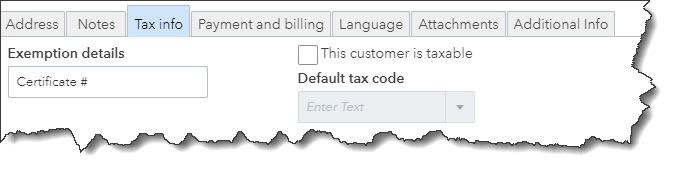
  • To whom you sell. Some customers (like nonprofit organizations) do not have to pay sales tax. You’ll need to edit their customer records to reflect this in QBO. Open a customer record and click the Edit link in the upper right. Click the Tax info tab and make sure there’s no checkmark in the box that says This customer is taxable. The Default tax code will be grayed out, and you can enter Exemption details in that field.

QuickBooks tips

Customer records for exempt organizations should contain details for that exemption. You’ll need to see their exemption certificate or at least know its official number.

Intuit now offers a revamped version of QuickBooks Online’s sales tax features.

At some point, you’ll be asked if you want to switch to the new, more automated system. The actual mechanics of the process are simple, but you’ll be moving historical and in-process data to a new structure. If you have sales tax set up right now and your situation is at all complicated, you’re going to want our help with the transition.

This enhanced feature only supports accrual accounting.

You can combine individual tax rates.

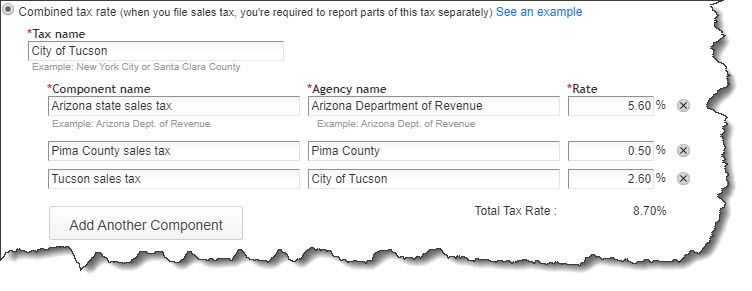
If you are required to pay city, county, and state sales tax rates for a particular customer, for example, you can create a Combined tax rate that contains all of the individual components. The customer will only see the total on an invoice or sales receipt, but QuickBooks Online will track each one accordingly for payment and reporting purposes.

QuickBooks tips

You can combine sales tax rates in QuickBooks Online (image above from current Sales Tax Center in QuickBooks Online, not the enhanced one).

Product and service records should contain sales tax information.

This is another area that will require some research. Just as some services are subject to tax, some products are not (like groceries in Arizona). So, you’ll need to find out what the rules are for what you sell. You can find this information on the website of the state’s Department of Revenue (sometimes called the Department of Taxation).

Once you know, you can record that status in QuickBooks Online. Open a product record by going to Sales | Products and Services and clicking Edit in the Action column or create a new one by clicking New in the upper right. Scroll down to Sales tax category in the record. You can choose between Taxable – standard rate and Nontaxable.

There’s a third option here: special category. This gets complicated. We can help you determine whether it applies to you.

QuickBooks Online tracks the sales tax you owe.

You can see what you owe to each agency by running the Sales Tax Liability Report, and record payments when you’ve made them. Summary and detail versions of the Taxable Sales report are also available.

Once you get sales taxes set up in QuickBooks Online, it’s easy to add them to the relevant sales forms. Getting to that point, though, takes time, study, and careful attention to detail. If you’re getting ready to sell, or you’re already selling and struggling with sales taxes, let us know. We can schedule an initial consultation to see how we can be of assistance.


Filed Under: QuickBooks

Business Start-Up Costs — What’s Deductible?

August 11, 2020 by Admin

She is devoted to her careerLaunching a new business takes hard work — and money. Costs for market surveys, travel to line up potential distributors and suppliers, advertising, hiring employees, training, and other expenses incurred before a business is officially launched can add up to a substantial amount.

The tax law places certain limitations on tax deductions for start-up expenses.

  • No deduction is available until the business becomes active.
  • Up to $5,000 of accumulated start-up expenses may be deducted in the tax year in which the active business begins. This $5,000 limit is reduced (but not below zero) by the excess of total start-up costs over $50,000.
  • Any remaining start-up expenses may be deducted ratably over the 180-month period beginning with the month in which the active business begins.

Example: Gina spent $20,000 on start-up costs before her new business began on July 1, 2020. In the 2020 tax year, she may deduct $5,000 and the portion of the remaining $15,000 allocable to July through December of 2020 ($15,000/180 × 6 = $500), a total of $5,500. The remaining $14,500 may be deducted ratably over the remaining 174 months.

Instead of deducting start-up costs, a business may elect to capitalize them (treat them as an asset on the balance sheet). Deductions for “organization expenses” — such as legal and accounting fees for services related to forming a corporation or partnership — are subject to similar rules.

Send us an e-mail or call us today at 901-685-9411 to discuss your business needs with an experienced CPA. Or, request a free consultation online.

Filed Under: Business Tax

  • « Previous Page
  • Page 1
  • …
  • Page 11
  • Page 12
  • Page 13
  • Page 14
  • Page 15
  • …
  • Page 19
  • Next Page »

Primary Sidebar

Our Memphis CPA Services

  • Small Business Acccounting
  • QuickBooks Accounting
  • New Business Advisory
  • Tax Services
  • Accounting by Industry

Follow our Blog

Loading

Search

Categories

  • Business Best Practices
  • Business Tax
  • Covid
  • Incorporation
  • Individual Tax
  • QuickBooks
  • Real Estate
  • Small Business Taxes
  • Uncategorized

Connect

Memphis, TN CPA Firm

5100 Wheelis Drive, Suite 110
Memphis, TN 38117
901-685-9411

Copyright © 2020 · https://www.rikardneal.com/blog