• Skip to content
  • Skip to primary sidebar

Header Right

  • Our CPA Firm
  • About Us
  • Contact
  • FREE CONSULTATION

10 Tips for Better Budgeting…

November 20, 2020 by Admin

Rikard & Neal Business Tax…and how QuickBooks Online can help you with the mechanics.

If you already have a budget, it’s probably been difficult for you to stick with it for the last several months. Unless you provide products and/or services that have been in great demand since the COVID-19 pandemic took hold, you’ve had to adjust your budget significantly.

Better days are ahead, though, and now is a good time to start doing some planning for 2021. While there are still likely to be uncertainties next year, creating a budget will give you a starting point. A budget increases your awareness of all of your projected income and expenses, which may make it less likely that you’ll find yourself constantly running short on funds.

Here are some ways you can make your budgeting process more effective and realistic.

Use what you already know. Unless you’re starting a brand-new business, you already have the best resource possible: a record of your past income and expenses. Use this as the basis for your projections.

Be aware of your sales cycle. Even if you’re not a seasonal business, you’ve probably learned that some months or quarters are better than others. Budget conservatively for the slower months.

Distinguish between essential and non-essential expenses. Enter your budget items for the bills and other expenses that must be covered before you add optional categories.

QuickBooks tips

You can use data from a previous year to create a new budget in QuickBooks Online.

Keep it simple. Don’t budget down to the last paper clip. You risk budget burnout, and your reports will be unwieldy.

Build in some backup funding. Just as you’re supposed to have an emergency fund in your personal life, try to create one for your business.

Make your employees part of the process. You shouldn’t be secretive about the expense element of your budget. Try to get input from staff in areas where they have knowledge.

Overestimate your expenses, a little. This can help prevent “borrowing” from one budget category to make up for a shortfall in another.

Consider using excess funds to pay down debt. Debt costs you money. The sooner you pay it off, the sooner you can use those payments for some non-essential items.

Look for areas where you can change vendors. As you’re creating your budget think carefully about each supplier of products and services. Can you find less costly alternatives?

Revisit your budget frequently. You should evaluate your progress at least once a month. In fact, you could even start by budgeting for only a couple of months at a time. You’ll learn a lot about your spending and sales patterns that you can use for future periods.

How QuickBooks Online Can Help

QuickBooks Online offers built-in tools to help you create a budget. Click the gear icon in the upper right corner and select Budgeting under Tools. Click Add budget. At the top of the screen, give your budget a Name and select the Fiscal Year it should cover from the drop-down list by that field. Choose an Interval (monthly, quarterly, or yearly) and indicate whether you want to Pre-fill data from an existing year.

QuickBooks tips

QuickBooks Online supplies a budget template that already contains commonly used small business items.

The final field is labeled Subdivide by, which is optional. You can set up budgets that only include selected Customers or Classes, for example. Select the desired divider in that field, then choose who or what you want included in the next. Click Next or Create Budget in the lower right corner (depending on whether you used pre-filled data) to open your budget template. If you subdivided the budget, you’ll see a field marked View budget for. Click the down arrow and select from the options listed there.

To create your budget, you simply enter numbers in the small boxes supplied. Columns are divided by months or quarters, depending on what you specified, and rows are labeled with budget items (Advertising, Gross Receipts, Legal & Professional Fees, etc.). You simply enter numbers in the boxes that apply. When you click in a box, a small arrow appears pointing right. Click on this, and your number will automatically appear in the rest of that row’s boxes. When you’re done, click Save in the lower right. You can edit your budget at any time.

QuickBooks Online provides two related reports. Budget Overview displays all of the data in your budget(s). Budget vs. Actuals shows you how you’re adhering to your budget.

We know creating a budget can be challenging, but it’s so important – especially right now. We’d be happy to look at your company’s financial situation and see how QuickBooks’ budgeting tools—and its other accounting features—can help you get a better understanding of your finances.

SOCIAL MEDIA POSTS

Don’t have a budget set for your business? QuickBooks Online has tools that can simplify the process of creating one.

When you’re creating a budget, it’s helpful to distinguish between essential and non-essential expenses. QuickBooks Online has tools that can help you, including budgeting for necessities first.

When was the last time you shopped for new suppliers? Now is a good time to see if you could save some money and help with your budget. QuickBooks Online has many tools that can help both you and your business budget.

Did you know QuickBooks Online allows you to use existing income and expense data to create a budget? Here is how this is done.

Send us an e-mail or call us today at 901-685-9411 to discuss your business needs with an experienced CPA. Or, request a free consultation online.

Filed Under: QuickBooks

Fix Your Bottom Line by Raising Your Prices

October 9, 2020 by Admin

Analyzing electronic documentYou can’t keep prices the same indefinitely, but raising them is always a gamble. Consumers can — and do — compare prices anywhere, anytime, on everything.

If your bottom line needs a boost, raising prices can definitely help — as long as you map out a strategy and avoid some common pitfalls.

Promote, Promote, Promote

When you’re ready to roll out the increase, plan to roll out some promotions and coupons at the same time to take the sting out of higher prices. The discounts will help keep your most cost-conscious consumers in the fold. Making discounts and coupons readily available establishes the perception that all your prices are reasonable, which may or may not be true.

If you’re concerned about promotions hurting your bottom line, don’t be. Not all of your customers will clip coupons or shop sales. Ideally, you’ll sell enough items at the higher price to raise the average sale. If that’s not happening, you can always give prices another nudge, although it’s better to go with one large increase than several small ones.

Cut Carefully

Another way to improve your financial picture is to cut costs. One common tactic is to keep the price the same but shrink the amount of product (e.g., a skinnier box of cereal or slimmer container of juice). But this can backfire. If customers discover the change and feel cheated, you could become the target of a social media campaign, which could turn out badly. You could end up with less business and a ruined reputation.

Get Creative

Thinking outside the box (rather than shrinking it) might provide some opportunities to increase revenue. For instance, you might be able to unbundle a popular product. You can actually lower the price of the basic item, then add additional charges for each bell and whistle.

Add Value

Big box stores and online shopping may help customers find lower prices, but there’s one thing they can’t do. They can’t give their customers the kind of service you can. That’s a value only small businesses can offer. If you do it right, it can help you weather a price increase.

Call us today for more tips on how to ensure you’re following business best practices, and let us help you keep your company in the black.

Send us an e-mail or call us today at 901-685-9411 to discuss your business needs with an experienced CPA. Or, request a free consultation online.

Filed Under: Business Best Practices

5 Things You Need to Know About Sales Taxes in QuickBooks Online

September 29, 2020 by Admin

Woman Working At Desk In Busy Creative OfficeThe most important thing you need to know about sales tax is that administering it correctly can be challenging.

If you sold only one type of product to customers in one city, collecting and paying sales tax would be easy. But most businesses have a wider reach than that.

QuickBooks Online offers tools that allow you to set up sales tax rates and include sales tax on sales forms. Further, it calculates how much you must pay to state and local taxing agencies.

This is one of the most complicated areas in QuickBooks Online because you may have to deal with numerous taxing agencies. If you’re not already working with sales taxes, we strongly recommend you let us help you get everything set up correctly from the start. Taxing agencies can audit your recordkeeping and you want to make sure it is set up correctly.

That said, here are five things we think you should know.

QuickBooks Online calculates sales tax rates based on:

  • Where you sell. Every state is different. If your business is located in Florida and you sell to a customer in Minnesota, you’ll be charging any sales tax levied by the state of Minnesota and possibly the city and county and other taxing authorities – if you have a connection, a “nexus” in that state (a physical location, active salesperson, etc.).
  • What you sell.
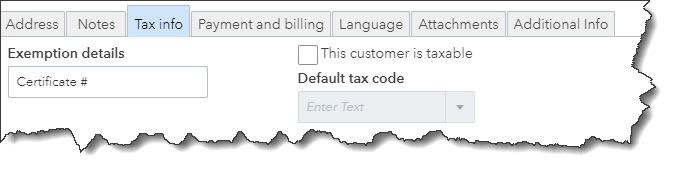
  • To whom you sell. Some customers (like nonprofit organizations) do not have to pay sales tax. You’ll need to edit their customer records to reflect this in QBO. Open a customer record and click the Edit link in the upper right. Click the Tax info tab and make sure there’s no checkmark in the box that says This customer is taxable. The Default tax code will be grayed out, and you can enter Exemption details in that field.

QuickBooks tips

Customer records for exempt organizations should contain details for that exemption. You’ll need to see their exemption certificate or at least know its official number.

Intuit now offers a revamped version of QuickBooks Online’s sales tax features.

At some point, you’ll be asked if you want to switch to the new, more automated system. The actual mechanics of the process are simple, but you’ll be moving historical and in-process data to a new structure. If you have sales tax set up right now and your situation is at all complicated, you’re going to want our help with the transition.

This enhanced feature only supports accrual accounting.

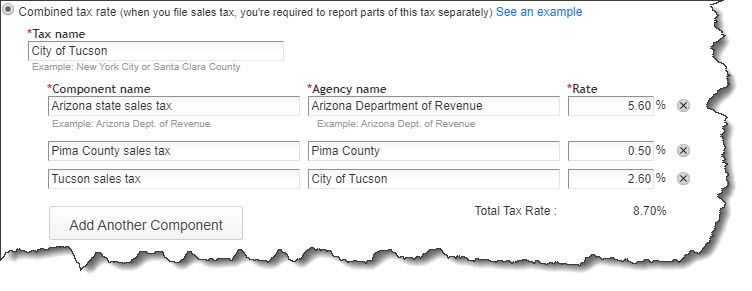
You can combine individual tax rates.

If you are required to pay city, county, and state sales tax rates for a particular customer, for example, you can create a Combined tax rate that contains all of the individual components. The customer will only see the total on an invoice or sales receipt, but QuickBooks Online will track each one accordingly for payment and reporting purposes.

QuickBooks tips

You can combine sales tax rates in QuickBooks Online (image above from current Sales Tax Center in QuickBooks Online, not the enhanced one).

Product and service records should contain sales tax information.

This is another area that will require some research. Just as some services are subject to tax, some products are not (like groceries in Arizona). So, you’ll need to find out what the rules are for what you sell. You can find this information on the website of the state’s Department of Revenue (sometimes called the Department of Taxation).

Once you know, you can record that status in QuickBooks Online. Open a product record by going to Sales | Products and Services and clicking Edit in the Action column or create a new one by clicking New in the upper right. Scroll down to Sales tax category in the record. You can choose between Taxable – standard rate and Nontaxable.

There’s a third option here: special category. This gets complicated. We can help you determine whether it applies to you.

QuickBooks Online tracks the sales tax you owe.

You can see what you owe to each agency by running the Sales Tax Liability Report, and record payments when you’ve made them. Summary and detail versions of the Taxable Sales report are also available.

Once you get sales taxes set up in QuickBooks Online, it’s easy to add them to the relevant sales forms. Getting to that point, though, takes time, study, and careful attention to detail. If you’re getting ready to sell, or you’re already selling and struggling with sales taxes, let us know. We can schedule an initial consultation to see how we can be of assistance.


Filed Under: QuickBooks

Business Start-Up Costs — What’s Deductible?

August 11, 2020 by Admin

She is devoted to her careerLaunching a new business takes hard work — and money. Costs for market surveys, travel to line up potential distributors and suppliers, advertising, hiring employees, training, and other expenses incurred before a business is officially launched can add up to a substantial amount.

The tax law places certain limitations on tax deductions for start-up expenses.

  • No deduction is available until the business becomes active.
  • Up to $5,000 of accumulated start-up expenses may be deducted in the tax year in which the active business begins. This $5,000 limit is reduced (but not below zero) by the excess of total start-up costs over $50,000.
  • Any remaining start-up expenses may be deducted ratably over the 180-month period beginning with the month in which the active business begins.

Example: Gina spent $20,000 on start-up costs before her new business began on July 1, 2020. In the 2020 tax year, she may deduct $5,000 and the portion of the remaining $15,000 allocable to July through December of 2020 ($15,000/180 × 6 = $500), a total of $5,500. The remaining $14,500 may be deducted ratably over the remaining 174 months.

Instead of deducting start-up costs, a business may elect to capitalize them (treat them as an asset on the balance sheet). Deductions for “organization expenses” — such as legal and accounting fees for services related to forming a corporation or partnership — are subject to similar rules.

Send us an e-mail or call us today at 901-685-9411 to discuss your business needs with an experienced CPA. Or, request a free consultation online.

Filed Under: Business Tax

Protecting Your Company’s S Corporation Election

July 23, 2020 by Admin

Business team analyzing market researchLike many business owners, you may have structured your business as an S corporation because of the tax benefits it offers. An S corporation provides the same limited liability as a traditional C corporation, but it generally avoids the double taxation associated with a C corporation. You and the other shareholders (if any) pay income taxes on corporate income directly.

Once you have an S election in place, it’s important to make sure you avoid taking any action that would put the election in jeopardy. Your corporation’s failure to meet certain tax law requirements on an ongoing basis could result in the IRS’s termination of its S corporation status.

  • Ownership. An S corporation generally may not have a corporate shareholder. (Exception: An S corporation may be wholly owned by another S corporation.) All shareholders generally must be individuals, estates, certain trusts, or tax-exempt 501(c)(3) charitable organizations. However, a partnership may hold S corporation stock as a nominee for an eligible shareholder. Nonresident aliens may not be shareholders.
  • Number of shareholders. An S corporation may not have more than 100 shareholders. For purposes of this limit, a husband and wife are treated as one shareholder, as are certain other related individuals.
  • Stock. An S corporation may have only one class of stock. Generally, a corporation is treated as having only one class of stock if all outstanding shares of the corporation’s stock confer identical rights to distribution and liquidation proceeds.

We offer a FREE initial consultation to business owners. Email us or call us at 901-685-9411 today.

Filed Under: Business Best Practices

“Extender” Legislation Impacts Individuals and Small Businesses

June 1, 2020 by Admin

Rikard & Neal CPAsThe federal spending package that was enacted in the waning days of 2019 contains numerous provisions that will impact both businesses and individuals. In addition to repealing three health care taxes and making changes to retirement plan rules, the legislation extends several expired tax provisions. Here is an overview of several of the more important provisions in the Taxpayer Certainty and Disaster Relief Act of 2019.

Deduction for Mortgage Insurance Premiums

Before the Act, mortgage insurance premiums paid or accrued before January 1, 2018, were potentially deductible as qualified residence interest, subject to a phase-out based on the taxpayer’s adjusted gross income (AGI). The Act retroactively extends this treatment through 2020.

Reduction in Medical Expense Deduction Floor

For 2017 and 2018, taxpayers were able to claim an itemized deduction for unreimbursed medical expenses to the extent that such expenses were greater than 7.5% of AGI. The AGI threshold was scheduled to increase to 10% of AGI for 2019 and later tax years. Under the Act, the 7.5% of AGI threshold is extended through 2020.

Qualified Tuition and Related Expenses Deduction

The above-the-line deduction for qualified tuition and related expenses for higher education, which expired at the end of 2017, has been extended through 2020. The deduction is capped at $4,000 for a taxpayer whose modified AGI does not exceed $65,000 ($130,000 for those filing jointly) or $2,000 for a taxpayer whose modified AGI is not greater than $80,000 ($160,000 for joint filers). The deduction is not allowed with modified AGI of more than $80,000 ($160,000 if you are a joint filer).

Credit for Energy-Efficient Home Improvements

The 10% credit for certain qualified energy improvements (windows, doors, roofs, skylights) to a principal residence has been extended through 2020, as have the credits for purchases of energy efficient property (furnaces, boilers, biomass stoves, heat pumps, water heaters, central air conditions, and circulating fans), subject to a lifetime cap of $500.

Empowerment Zone Tax Incentives

Businesses and individual residents within economically depressed areas that are designated as “Empowerment Zones” are eligible for special tax incentives. Empowerment Zone designations, which expired on December 31, 2017, have been extended through December 31, 2020, under the new tax law.

Employer Tax Credit for Paid Family and Medical Leave

A provision in the tax code permits eligible employers to claim an elective general business credit based on eligible wages paid to qualifying employees with respect to family and medical leave. This credit has been extended through 2020.

Work Opportunity Tax Credit

Employers who hire individuals who belong to one or more of 10 targeted groups can receive an elective general business credit under the Work Opportunity Tax Credit program. The recent tax law extends this credit through 2020.

Call our Memphis, TN CPA now at 901-685-9411 to find out how we can decrease your tax obligations. We offer a free initial consultation to new clients so contact us today.

Filed Under: Business Tax

  • « Previous Page
  • Page 1
  • …
  • Page 12
  • Page 13
  • Page 14
  • Page 15
  • Page 16
  • …
  • Page 20
  • Next Page »

Primary Sidebar

Our Memphis CPA Services

  • Small Business Acccounting
  • QuickBooks Accounting
  • New Business Advisory
  • Tax Services
  • Accounting by Industry

Follow our Blog

Loading

Search

Categories

  • Business Best Practices
  • Business Tax
  • Covid
  • Incorporation
  • Individual Tax
  • QuickBooks
  • Real Estate
  • Small Business Taxes
  • Uncategorized

Connect

Memphis, TN CPA Firm

5100 Wheelis Drive, Suite 110
Memphis, TN 38117
901-685-9411

Copyright © 2020 · https://www.rikardneal.com/blog